RSC - React Server Components
推荐阅读 https://www.joshwcomeau.com/react/server-components/
本文是一些总结
SSR
理解 RSC 前先理解 SSR - Server Side Rendering,这里有个相对概念 CSR - Client Side Rendering
SSR 会在 server runtime 如 Node.js,使用 ReactDOMServer APIs 进行 initial render
CSR 就是在客户端进行 initial render,不需要 server runtime
这样到用户的 HTML 就会包含 initial render 的内容
initial render 的时机可能有二
- 在用户访问页面的时候 on-demand
- 在构建的时候 compile-time (我们也叫 SSG static site generation)
在没有 RSC 的时候,SSR 咋做的?
有仨指标先要提一下
- First Paint — The user is no longer staring at a blank white screen. The general layout has been rendered, but the content is still missing. This is sometimes called FCP (First Contentful Paint).
- Page Interactive — React has been downloaded, and our application has been rendered/hydrated. Interactive elements are now fully responsive. This is sometimes called TTI (Time To Interactive).
- Content Paint — The page now includes the stuff the user cares about. We’ve pulled the data from the database and rendered it in the UI. This is sometimes called LCP (Largest Contentful Paint).
图中的 Render Shell 指的是 Loading 相关的动画 Hydration is like watering the “dry” HTML with the “water” of interactivity and event handlers. (解释下图中的 Hydrate)
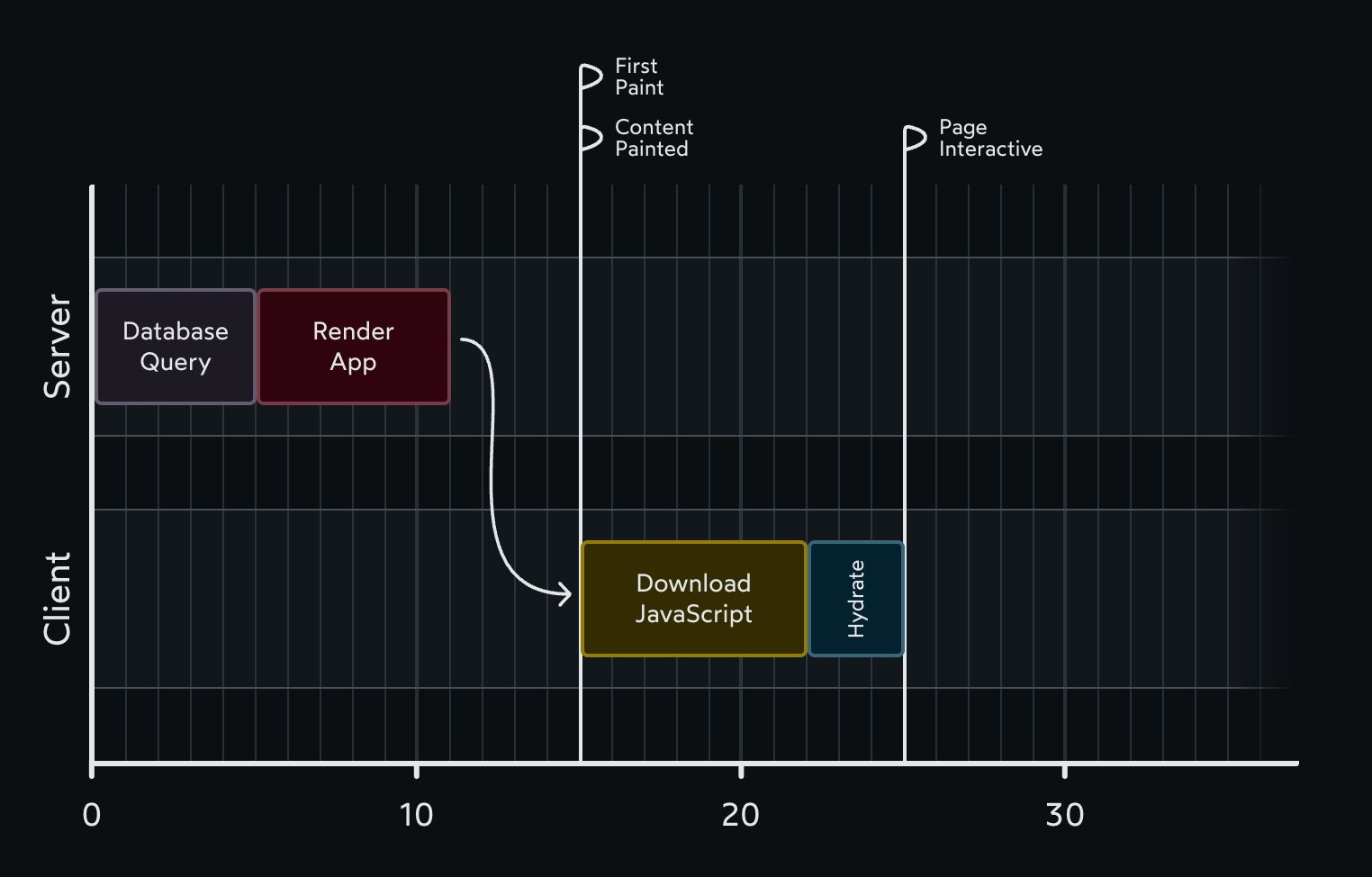
为了实现上图的效果,需要在服务端执行一些请求代码,号称支持 SSR 的框架都给了一些方案实现,下面是 Next 的 legacy Page router 方案
import db from 'imaginary-db';

// This code only runs on the server:
export async function getServerSideProps() {
  const link = db.connect('localhost', 'root', 'passw0rd');
  const data = await db.query(link, 'SELECT * FROM products');

  return {
    props: { data },
  };
}

// This code runs on the server + on the client
export default function Homepage({ data }) {
  return (
    <>
      <h1>Trending Products</h1>

      {data.map((item) => (
        <article key={item.id}>
          <h2>{item.title}</h2>
          <p>{item.description}</p>
        </article>
      ))}
    </>
  );
}
这种方案有以下问题
- This strategy only works at the route level, for components at the very top of the tree. We can’t do this in any component.
- Each meta-framework came up with its own approach. Next.js has one approach, Gatsby has another, Remix has yet another. It hasn’t been standardized.
- All of our React components will always hydrate on the client, even when there’s no need for them to do so.
RSC 就是来解决这些问题的
RSC
RSC 是一套新的渲染方案,在这个方案中新引入了 Server Component,同时过去的组件称为 Client Component
SC
下面是一段 Server Component 的案例
import db from 'imaginary-db';

async function Homepage() {
  const link = db.connect('localhost', 'root', 'passw0rd');
  const data = await db.query(link, 'SELECT * FROM products');

  return (
    <>
      <h1>Trending Products</h1>
      {data.map((item) => (
        <article key={item.id}>
          <h2>{item.title}</h2>
          <p>{item.description}</p>
        </article>
      ))}
    </>
  );
}

export default Homepage;
Server Component 的特性是:Server Components never re-render. They run once on the server to generate the UI. The rendered value is sent to the client and locked in place.
看着这个概念很简单,但用起来要放在整个 RSC 新范式的背景下理解,现在同时有俩类型的组件,单从名字上理解是容易乱的,下图从 render where 进行了区分
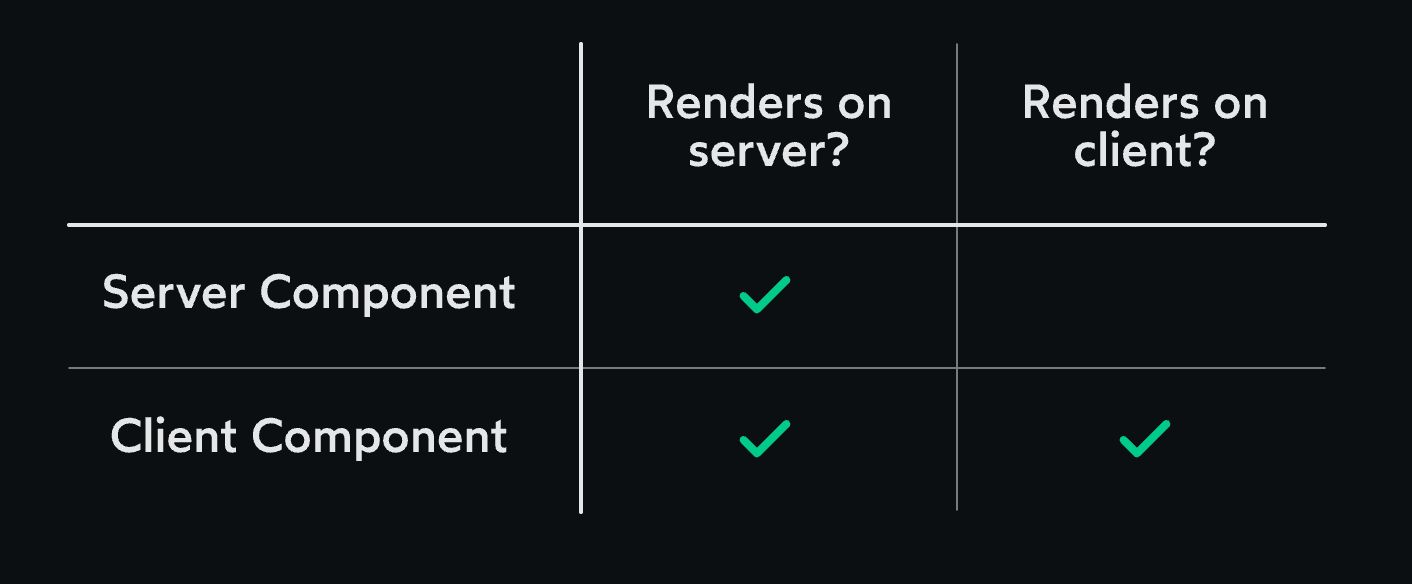
This new paradigm introduces a new type of component, Server Components. These new components render exclusively on the server. Their code isn’t included in the JS bundle, and so they never hydrate or re-render.
如果是个组件是 SC(Server Component),那么不会在 JS bundle 里带上这个组件的代码,没有代码,也不会参与 hydrate「所以不能绑定事件」
RSC 和 SSR
RSC 和 SSR 经常放一起,容易误解为 RSC 是 SSR 2.0,这样是有问题的 Server Components (RSC) 确实在服务器上运行。但是,它之所以被赋予一个新名称,是因为它与传统 SSR 有两个核心区别:
1. 产物(The Output)不同
| 概念 | 运行地点 | 产物(输出结果) | 目标 |
|---|---|---|---|
| 传统 SSR | 服务器 | HTML 字符串 | 优化首屏加载和 SEO,客户端接收后需要 水合 (Hydration)。 |
| RSC | 服务器 | RSC Payload (序列化的组件树描述) | 零客户端 JS,高效数据传输,只在需要时发送数据。 |
2. 运行时(The Runtime)不同
- 传统 SSR: 即使组件在服务器上渲染,它本质上仍是客户端组件,它的所有代码(包括事件处理器、状态逻辑等)最终都必须被打包并发送到浏览器进行水合。SSR 只是在服务器上提前执行了客户端的渲染逻辑。
- RSC: Server Components 是服务器专属的组件。它们的代码永远不会离开服务器,因此它们不能包含任何客户端状态或事件处理逻辑。这是实现 Zero-Client-JS 的根本。
结论
可以把 RSC 看作是 “数据获取和组件描述的服务器执行”,而传统的 SSR 是 “客户端组件的提前渲染为 HTML”。
在实际使用的时候,像 Next.js 这样的框架中,SSR 扮演了“入口”的角色:
- 初始加载优化: 当用户首次访问页面时,浏览器需要尽快获得可渲染的内容。
- RSC -> SSR 流程: 框架首先在服务器上执行您的 Server Components,生成 RSC Payload。
- 最终 HTML: 框架会利用这个 RSC Payload 和 页面上所有 Client Components 的结构,将整个页面渲染成一个完整的 HTML 字符串。
- 发送给浏览器: 浏览器接收到这个 HTML 就可以立即显示内容(首屏渲染快)。
- 水合: 浏览器加载 Client Components 的 JS Bundle,然后对 HTML 中对应的 Client Components 部分进行 水合 (Hydration),使其具备交互能力。
SC 的执行也不依赖必须要个服务器持续运行,走 SSG 跑 SC 就好了
如何声明 Client Component
In this new “React Server Components” paradigm, all components are assumed to be Server Components by default. We have to “opt in” for Client Components.
'use client';

import React from 'react';

function Counter() {
  const [count, setCount] = React.useState(0);

  return (
    <button onClick={() => setCount(count + 1)}>
      Current value: {count}
    </button>
  );
}

export default Counter;
Boundaries
function HitCounter({ hits }) {
  return (
    <div>
      Number of hits: {hits}
    </div>
  );
}
如上述组件,在 RSC 新渲染模式下 1 组件默认就是 SC 2 SC 是不会 rerender 的
那么问题来了,如果 hit 0 -> 1,理论上 SC 不会 re render,那么这里咋变的呢?
为了理解这个问题,我们不能孤立的看 SC,而是要站在整个应用的视角来看
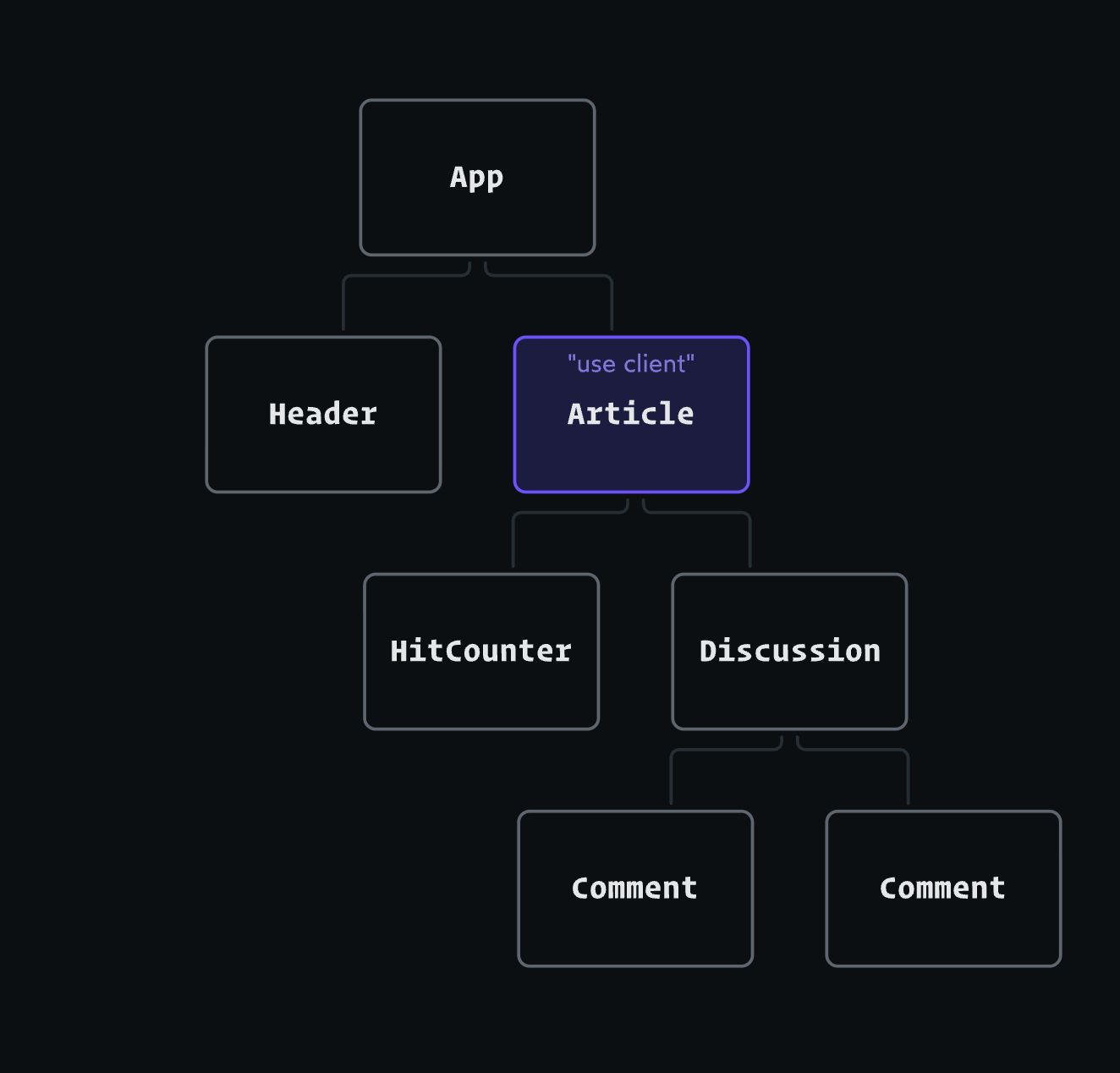
假设我们有上述组件树,如果他们都是 SC,那么 hit 是不可能变的
假设 Article 持有了 hit 的状态
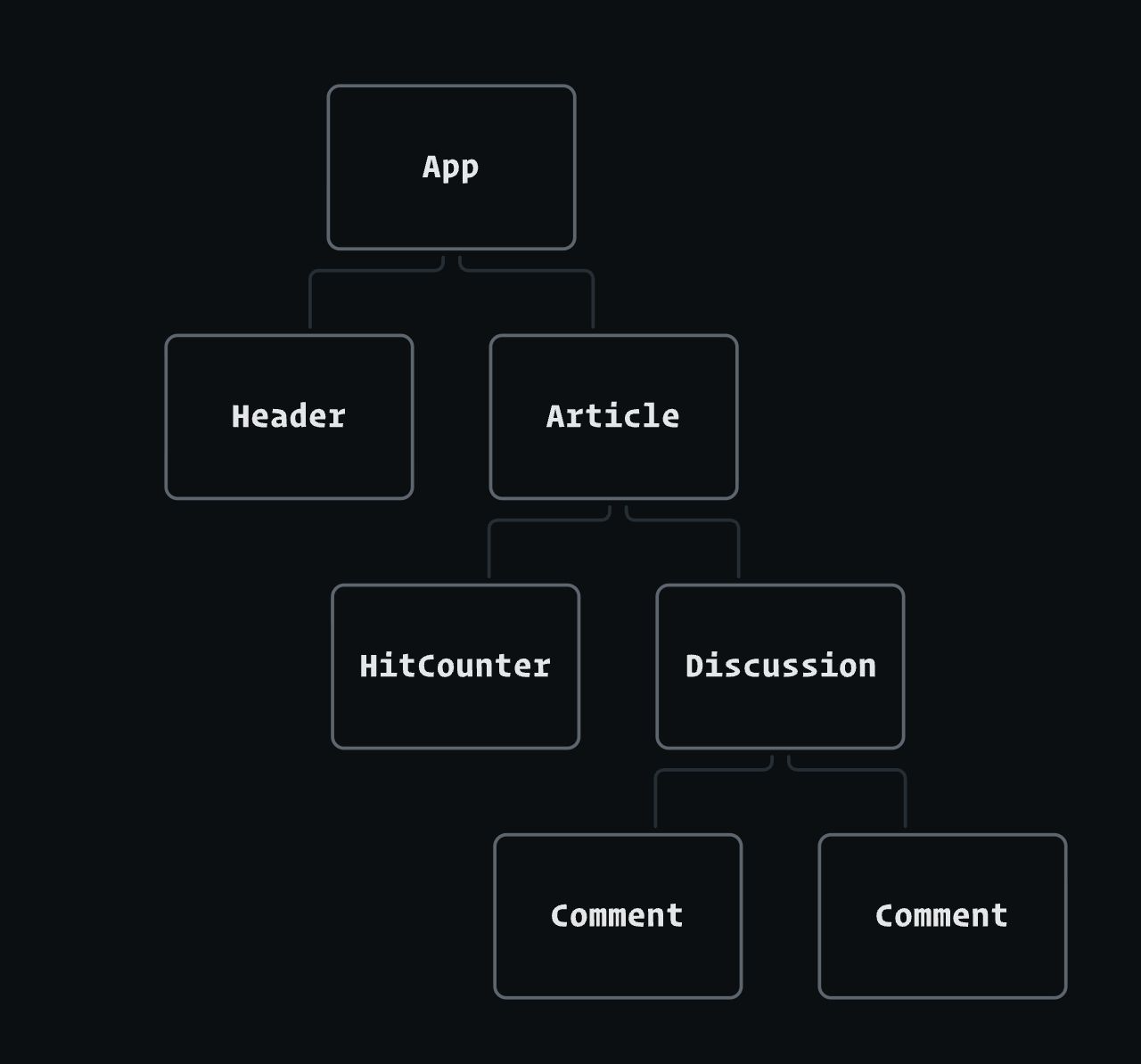
hit 变化, Article 下属的组件也应该 re render,但因为下属组件默认是 SC,所以不能 rerender,这就有 bug 了
In order to prevent this impossible situation, the React team added a rule: Client Components can only import other Client Components. That
'use client'directive means that these instances ofHitCounterandDiscussionwill need to become Client Components.
官方有规则:Client Component 只能引入 Client Component,也就意味着 Article 的下属组件需要变为 Client Component
这是 SRC 带来了最大变化,这个变化的核心就是去规划你的 client boundaries 在哪里
When we add the
'use client'directive to theArticlecomponent, we create a “client boundary”. All of the components within this boundary are implicitly converted to Client Components. Even though components likeHitCounterdon’t have the'use client'directive, they’ll still hydrate/render on the client in this particular situation.
This means we don’t have to add
'use client'to every single file that needs to run on the client. In practice, we only need to add it when we’re creating new client boundaries.
你不需要去为每一个组件都去加 use client,框架会根据 client boundaries 去自动变化
顶部状态咋办
'use client';

import { DARK_COLORS, LIGHT_COLORS } from '@/constants.js';

import Header from './Header';
import MainContent from './MainContent';

function Homepage() {
  const [colorTheme, setColorTheme] = React.useState('light');

  const colorVariables = colorTheme === 'light'
    ? LIGHT_COLORS
    : DARK_COLORS;

  return (
    <body style={colorVariables}>
      <Header />
      <MainContent />
    </body>
  );
}
如果我需要支持类似这样的状态,岂不意味着下面的组件都变为了 Client Component
看起来是有点麻烦,但是有办法解决的 下面是修改后的结果
// /components/ColorProvider.js
'use client';

import { DARK_COLORS, LIGHT_COLORS } from '@/constants.js';

function ColorProvider({ children }) {
  const [colorTheme, setColorTheme] = React.useState('light');

  const colorVariables = colorTheme === 'light'
    ? LIGHT_COLORS
    : DARK_COLORS;

  return (
    <body style={colorVariables}>
      {children}
    </body>
  );
}
// /components/Homepage.js
import Header from './Header';
import MainContent from './MainContent';
import ColorProvider from './ColorProvider';
function Homepage() {
return (
<ColorProvider>
<Header />
<MainContent />
</ColorProvider>
);
}这样 Homepage 就仍然可以保持为 Client Component 了
But wait a second.
ColorProvider, a Client Component, is a parent toHeaderandMainContent. Either way, it’s still higher in the tree, right?
When it comes to client boundaries, though, the parent/child relationship doesn’t matter.
Homepageis the one importing and renderingHeaderandMainContent. This means thatHomepagedecides what the props are for these components.
To be more precise, the
'use client'directive works at the file / module level. Any modules imported in a Client Component file must be Client Components as well. When the bundler bundles up our code, it’ll follow these imports, after all!
尽管从组件嵌套结构上来看,ColorProvider 这个 client component 包住了 Header、MainContent 这俩 SC,但这并不影响他俩仍作为 SC 渲染,client boundaries 的生效范围是在文件级别去影响的
Homepage 现在不是 client component 了,这样就不影响其导入的组件变为 client component
优势
RSC 模式下
SC 的代码不会进 JS bundle
- bundle 减小
- 之前 CSR 下更多功能意味着更多代码,现在可以都要了,因为只会返回用户用到的部分的渲染结果,如 highlighting 库 Prism
A proper syntax-highlighting library, with support for all popular programming languages, would be several megabytes, far too large to stick in a JS bundle. As a result, we have to make compromises, trimming out languages and features that aren’t mission-critical.
But, suppose we do the syntax highlighting in a Server Component. In that case, none of the library code would actually be included in our JS bundles. As a result, we wouldn’t have to make any compromises, we could use all of the bells and whistles.
This is the big idea behind Bright(opens in new tab), a modern syntax-highlighting package designed to work with React Server Components.